
OpenRoads Tip: Missing Graphic Manipulators
Written by Bob Mecham
I am writing this tip because this doesn’t happen often so when it does I really have to rack my brain to remember why. Hopefully writing this tip will help me remember it more quickly next time and save you the same headache.
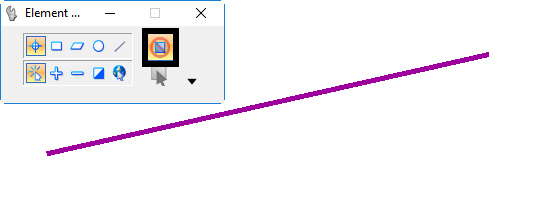
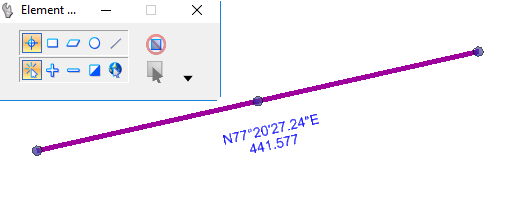
When working with Civil Geometry in OpenRoads you are used to using the Graphic Manipulators. It might happen when you select the Civil Geometry and the manipulators will not appear.
This occurs when the Element Selection tool toggle to Disable Handles is toggled ON.
For more OpenRoads tips visit our home tip page.
Hi, this doesn’t seem to work for me. Toggling the element selection on and off yields no results
Thanks Allan. Worked for me. Much simpler than Bentleys solution below:
“Manipulators or Handles are missing in Drainage files
Article metadata. Authored by Tejbir Singh This article was updated• 12mo ago12 months ago This article has 72 views.• 72 Views This article has average rating: 0 out of 5 stars• ( )( ) ( ) ( ) ( )
Problem
My files does not show the Manipulators / Handles which allows pipes and drainage structures to move.
Solution
The reason might be corrupted dgn file.
To solve this follow the steps below
Step 1: Open the DGN, then do a Save-as new file.
Step 2: In the new DGN use Drainage and Utilities > Tools > Synchronize Drawing, answering Yes to the prompts.
Step 3: After that, you can select a pipe or conduit and see both its manipulators”