
When in break mode, selecting the Call Stack button in the Debug toolbox displays the Call Stack window. The call stack window displays the subs/functions called in sequence to get to the current line of code.

The current function is displayed at the top of the listing.
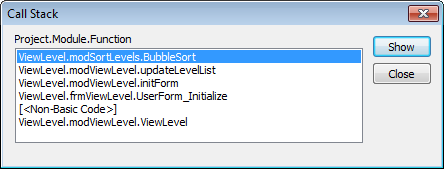
This is very useful in determining how your macro got the current line of code.
Last Month’s Tips:
Don’t want to miss out on other great information? Subscribe to this blog or our monthly eNewsletter now! Learn More ◊ Contact us today ◊ Newsletter ◊


