
Like a Message Box, the InputBox displays a modal dialog with a message/prompt string and a tile. With an InputBox there are nooptions for what buttons to display. The InputBox always displays a text field to capture user text input. If the user selects the OK button in the InputBox dialog the string in the text field is returned as a string.
The basic InputBox function syntax is as follows:
InputBox(Prompt string, Dialog title, Default string value)
Example:
Dim strInput As String
strInput = InputBox("Enter distance", "MyMacro", "5")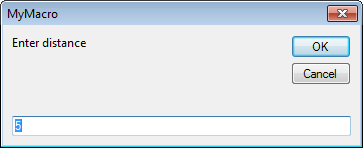
Last Month’s Tips:
MicroStation: V8i SS3 InRoads: Import AutoCAD Civil 3D 2014: VBA: Get Current Value
w/ Google Earth and … Graphics to Create … How to Add New Pipes … of all Your Var…
Don’t want to miss out on other great information? Subscribe to this blog or our monthly eNewsletter now! Learn More ◊ Contact us today ◊ Newsletter ◊


